
















MEL Script - Rename Shader(s) v.1.1.0 (8 Kb)
Tested Maya Versions: 2008, 2009
Last Updated: 06.30.2009
Download Here | Creative Crash page
Function:
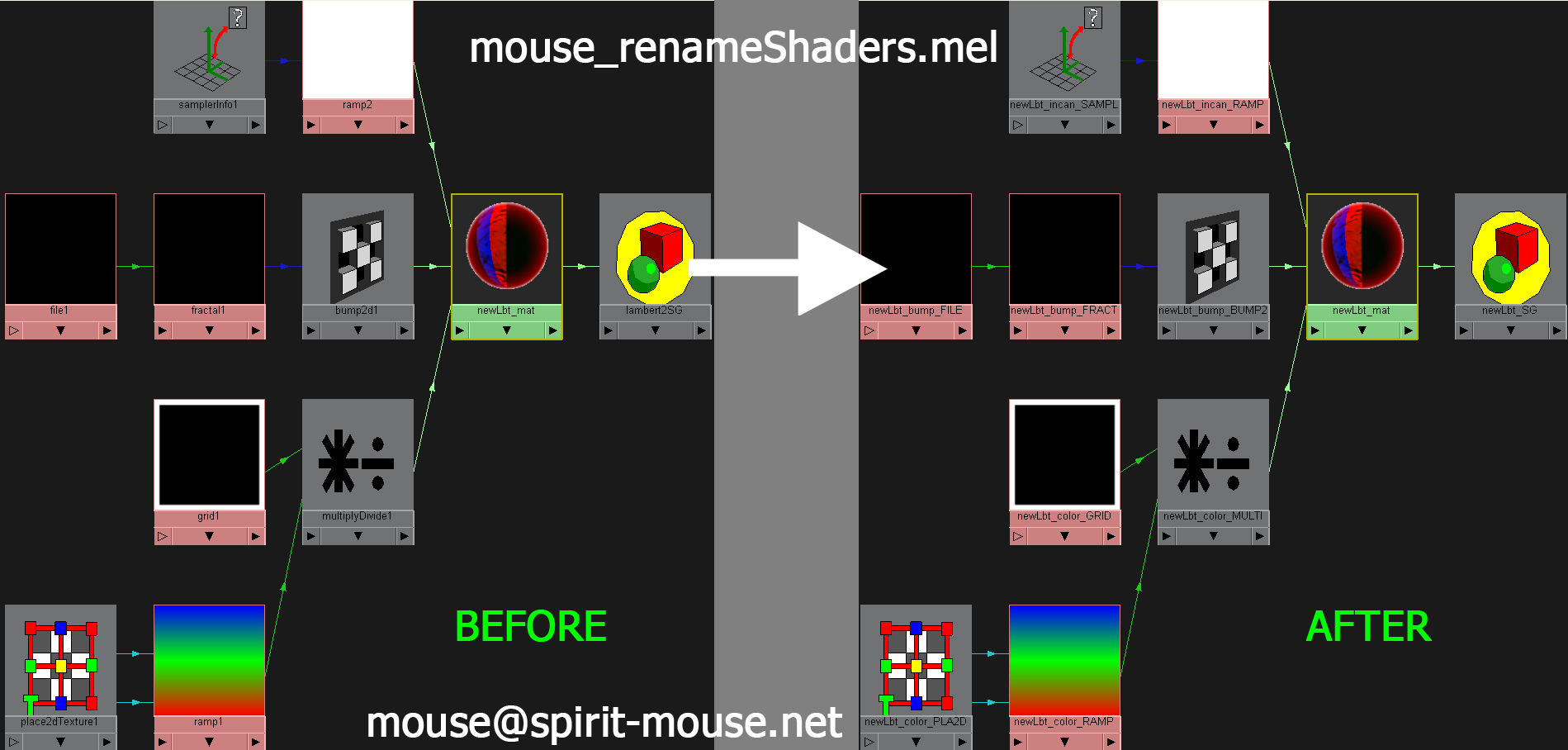
Batch rename selected shader(s) and its associated network with the following format:
shader's name + _connected attributes + _NODE TYPE
The script will work on all maya basic shaders, textures, render nodes and mental ray nodes.
Installation:
Unzip mouse_renameShaders.mel to maya's scripts folder.
(e.g. "C:\Users\My Documents\maya\scripts")
Usage:
To run the script, select shader(s) or mesh(s) with assigned shader, run the following in MEL script editor:
source "mouse_renameShaders.mel"; mouse_renameShaders;
The above command can be saved as a MEL shelf button.
The script will recognize "_mat" and "Mtl" suffix on the shader(s) and take that off the prefix.
e.g. shader = "testLambert_mat"
shader's color is connected to "file15"
after running the script, "file15" will become "testLambert_color_FILE"
Any question, comments or bugs are very welcome and please email me directly or send it through Creative Crash forum.
Screenshot: 01






The entire contents of this website are created and are the property of Marty M.Y. Hon - Spirit Mouse
You may not modify, copy, reproduce or republish any portion of the website contents without permission by Marty M.Y. Hon - Spirit Mouse.